Built for Windows 10 and 11 · 64-bit

Background Remove HD Keep Full Resolution.

Every online tool compresses your image or locks the full version behind a paywall. Easy Background Remover processes photos at their original resolution right on your PC—no upload, no watermark, no quality loss. Download once, remove backgrounds from unlimited images forever.

Full resolution preservedNo watermark, ever100% free, alwaysv1.1
Full resolution export100% offlineNo watermarkBatch processingFree forever
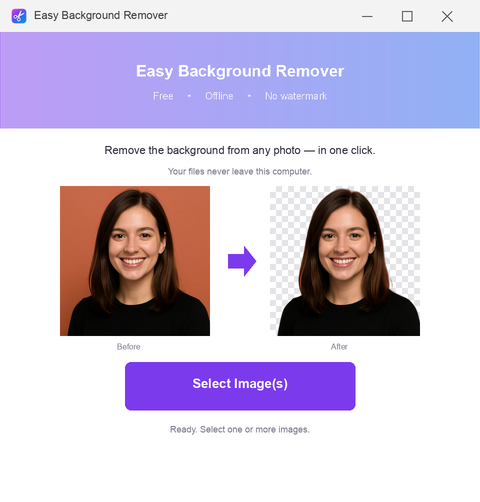
Easy Background Remover app window on Windows
Real results
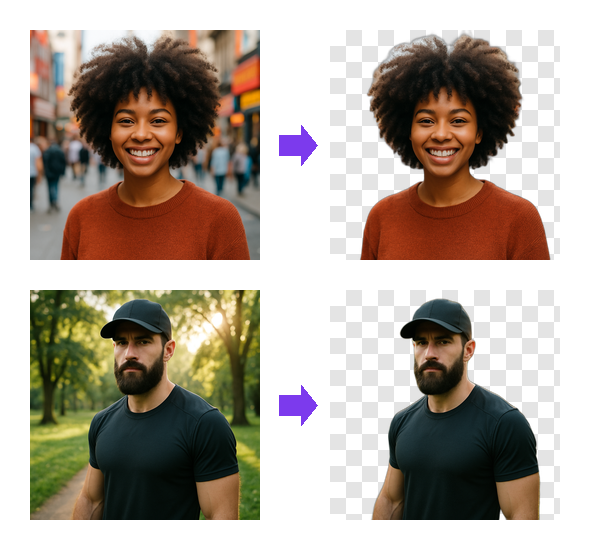
Before → afterEasy Background Remover result

See the full-resolution difference.

Most web tools downsize your image or add a watermark to the final PNG. Easy Background Remover outputs at the exact resolution you started with—every pixel intact. Whether it's a 4K photo or a small product shot, you get back what you put in.

No compressionOutput PNG keeps the original width and height.
No watermark everYour image is yours. Nothing stamped, nothing hidden.
Works offlineProcess sensitive photos without uploading them anywhere.
Why local beats online

Why download instead of using an online tool?

Web-based removers need your image on their server. Desktop apps don't.

Made for Windows

Easy Background Remover at a glance.

Version1.1
PlatformWindows 10 and 11, 64-bit
InstallPortable, no installer
LicenseMIT, source on GitHub
PriceFree, no account
LanguageEnglish
Quick start

How to remove a background in full resolution

Three clicks. No learning curve.

Versus web tools

How it stacks against free online removers.

Both are free. Only one keeps your image quality.

Easy Background Remover

  • Output resolution — Your original size
  • Watermark — None
  • Privacy — Offline, stays local
  • Batch processing — Unlimited
  • Cost — Free forever
  • Internet required — No

Typical online tool

  • Output resolution — Compressed or limited
  • Watermark — Yes, or paywall
  • Privacy — Uploaded to servers
  • Batch processing — One at a time
  • Cost — Free with limits
  • Internet required — Yes
Got questions?

Questions about full-resolution removal

Will my image be downscaled?

No. Easy Background Remover exports at the exact resolution of your original file. A 3000×2000 photo stays 3000×2000.

Does it add a watermark?

Never. Your PNG is clean and ready to use anywhere—no logo, no branding, no restrictions.

Do I need the internet?

No. The app runs 100% offline on your PC. Your images never leave your computer.

Can I process multiple images at once?

Yes. Select as many photos as you want and batch-process them in one go. No daily limits.

What file formats does it support?

It accepts common image formats and exports transparent PNGs. Perfect for photos, product shots, and artwork.

Is it really free?

Yes. Download it once, use it forever. No subscription, no hidden costs, no account signup.

Will it work on my Windows PC?

Yes, on Windows 10 and Windows 11. No GPU required—it runs on any machine with standard specs.

Get full-resolution backgrounds removed, no upload, no compromise.

Stop uploading your images to web services. Download Easy Background Remover and process photos at full quality, offline, with zero watermarks.

Download for Windows
Latest release · v1.1